

Monitoring and Evaluation
ContentMonitoring and Evaluation (M&E) refers to the set of activities used to assess the progress of a programme towards specific objectives and address weaknesses in the programme design.
Monitoring
It is a systematic, ongoing collection, collation, analysis and interpretation of the data to detect deviations from the expected norms, followed by dissemination of feedback information for corrective actions.
Significance of Monitoring
- Ensure that activities are implemented as planned
- Verifies that the data recorded and reported is accurate and valid
-
Provides evidence for making mid-course correction decisions
Evaluation
A systematic method for collecting, analysing, and using data mainly to examine the effectiveness and efficiency of the program for continuous program improvement. The evaluation consists of process evaluation, outcome evaluation and impact evaluation.
Significance of Evaluation
- Estimates the programmatic costs for implementation
- Measures the programme coverage
- Assess the TB treatment outcomes
- Assess the impact of implemented activities
Under the National TB Elimination Programme (NTEP), monitoring is conducted at various levels - Central, State, District, Tuberculosis Unit (TU) and Peripheral Health Institutes (PHIs) and the respective authorities at each of these units are responsible for the same, whereas evaluation is conducted mainly at the central and state level.
The programme has designed an M&E framework and is revising it time to time. NTEP’s Ni-kshay application facilitates case-based real-time monitoring of all the major programmatic indicators.
Resources
- Training Modules (5-9) for Programme Managers & Medical Officers, NTEP, CTD, 2020.
- Compendium of Indicators for Monitoring and Evaluating National Tuberculosis Programmes, WHO, 2004.
Assessment
Question Answer 1 Answer 2 Answer 3 Answer 4 Correct answer Correct explanation Page id Part of Pre-test Part of Post-test Monitoring and evaluation play an important role in which of the following? Assess the programme activities Measure programme effectiveness Identify problem areas All of the above 4 Monitoring and evaluation play an important role in assessing the programme’s effectiveness and activities and identifying problem areas. Nikshay
ContentNikshay is an Integrated ICT system for TB patient management and care in India. Nikshay was launched in 2012 and since then, various improvements have been made in the system.
Nikshay provides-
- A Unified interface for public and private sector health care providers
- Different types of Logins such as State, District, TU, PHI, Staff logins, Private providers, Chemist, Labs and PPSA/JEET Logins
- Integration of all adherence technologies such as 99DOTS and MERM
- Unified DSTB and DRTB data entry forms
- Mobile friendly website with mobile app
Nikshay is accessible either via web browser(https://Nikshay.in ) or mobile App called ‘Nikshay’ that can be downloaded from Google Play Store(Android).
Figure: Nikshay Login Pages
Deleted Patient Register
ContentThis is a list of all deleted records based on diagnosis date & as per all three health facilities (Enrollment, Diagnosing and current).
This register provides details such as date of deletion of the record and reason of deletion by user along with details of health facilities (Enrollment, Diagnosing and current).
Video fileVideo: Deleted Patient Register
Prescription Register
ContentVideo fileVideo: Prescription Register
DRTB Treatment Register
ContentThis is a line list of confirmed DRTB cases on treatment based on current health facilities.
Description: This register gives details about the tests and final interpretation based on the treatment start date and notification date:
- Health Facility ( Diagnosing & current facility details, ie.. State/District/ TU/PHI).
- Date of diagnosis and basis of diagnosis.
- Date of TB treatment initiation and regimen type.
- CBNAAT and Truenat Details - CBNAAT MTB Result, Rif Resistance, final interpretation and date reported.
- F line LPA and S line LPA Final interpretation.
Video fileVideo: DRTB Treatment Register
Follow-Up Register
ContentFollow-up Register- This is a line list of all cases for whom face-to-face or telephonic follow-up was done to enquire about their condition based on current facility and follow-up date. This includes patients on treatment.
Post Treatment Follow-up Register- This is a line list of all cases for whom face-to-face or telephonic follow-up is to be done to enquire about their condition based on current facility and eligibility as per the Treatment outcome date. This includes patients, not on treatment who are eligible for Post Treatment follow-up.Two new filters are introduced in this register:
Type of Follow-up Register- (Follow up, Post Treatment follow-up due).
Post-treatment interval period (All, 6 M, 12 M, 18 M, 24 M)– If Post Treatment follow-up is selected.Description: This register provides detailed information on the status of follow-up visits:
- Date and Mode of follow-up ( Face to face at home or health facility or any other place and telephonic).
- Login id used-individual log-in who entered the data.
- Improvement in patient’s health condition or not.
- Reason of missed dosage.
- Patient weight and days of medicine left.
- Next follow-up visit date and type.
- Travel history/ Migratory status.
- Financial barriers and accessibility issues.
Video fileVideo: Follow-Up Register
Private HF Register
ContentThis is a line list of all the private health facilities (active or inactive) registered in Nikshay and gives their beneficiary status if eligible for the incentive.
This register gives details about the private health facilities related to the following:
- Facility name and address.
- HF Code.
- Date when the facility was added.
- Contact person name and designation along with their contact details.
- Government registration number.
- Beneficiary status and Beneficiary ID.
Video fileVideo: Private HF Register
Comorbidity Register
ContentThis is a line list of all cases for whom comorbidity details are available in Nikshay based on current health facility and diagnosis date.
This register gives comorbidity details of the patients pertaining to following:
- Health Facility details (Current & Diagnosing facility i.e., State/District/ TU/PHI).
- HIV status and date of HIV testing.
- Date of CPT Delivered, date of referral to ART and date of ART initiation.
- Diabetic status (RBS, FBS) and whether initiated on anti-diabetic treatment.
- Other comorbidity details - Tobacco and alcohol intake history and whether linked for cessation or deaddiction.
Video fileVideo: Comorbidity Register
Beneficiary Register
ContentThis is a line list of all beneficiaries with their status as per the current health facilities and notification date.
This report provides information pertaining to the following:
- Beneficiary details - ID, status and rejection reasons.
- Whether the user has foregone benefits for a particular patient.
- Bank account details - Bank account number, IFSC code, and validated name of the account holder as per PFMS, PFMS Beneficiary ID.
- The number of benefits-eligible and number of benefits paid via Nikshay/ External/Paid in kind.
- The total amount eligible and total amount paid via Nikshay/ External/Paid in kind.
Video fileVideo: Beneficiary Register
CDST Test Register
ContentThis is a line list of all cases for whom CDST test was conducted and the final interpretation is available based on the testing facility. Separate register is available for various test types- CBNAAT, TRUNAAT MTB, TRUNAAT MTB-Rif, Culture, DST, F Line LPA and S Line LPA.
This register gives details about the tests and final interpretation:
- Test details - Test ID, Date of testing and reporting, Date of specimen collection.
- Reason for testing.
- Treatment status and date of treatment initiation.
- Number of HCP visits before diagnosis of current episode and duration of predominant symptom.
- Specimen details - Visual appearance of sputum, serial number, Rif resistance.
- Final interpretation of T.B.
Video fileVideo: CDST Test Register
Patient Lab Register
ContentThis is a list of all notified patients for whom any lab test was requested and test results are available during the selected period.
This register gives details about the tests and final interpretation:
- Diagnosing facility details - State/District/ TU/PHI.
- Details of Chest X-ray, microscopy, CBNAAT, Trunat, FLPA, SLPA, Culture and DST - Nikshay entry date, specimen collected date, date reported and final interpretation.
Video fileVideo: Patient Lab Register
Enrollment Register
ContentThis is a list of all cases enrolled based on enrolment (registration) date and enrolment facility.
This register gives details about enrollment:
- Enrollment date.
- Health Facility (Enrollment, Diagnosing and current facility details ie.. State/District/ TU/PHI).
- Patient status and comorbidity status (HIV and Diabetes status).
- Demographic information.
- Treatment initiation date along with final outcome.
- Drug resistance.
- No. of Followup done.
- Diagnostic details ( Basis: test name and final interpretation, microbiological confirmation).
- Contact tracing details.
Video fileVideo: Enrollment Register
Deduplication Register
ContentVideo fileVideo: Deduplication Register
Contact Tracing Register
ContentThis report gives a detailed information on patients age-group-wise (above/below five/six years) for whom contact tracing visits are done. This now includes the ability to trace contacts of notified TB patients who have Latent TB.
This report enables user to view at a glance:
Health facility details (Diagnosing and current facility ie.. State/District/ TU/PHI).
Total household contacts (Age group wise : above/below five/six years) , number of contacts screened, number of cases with symptoms, number of evaluated, number of cases diagnosed and on treatment, number eligible for TPT, number provided TPT.Note: As per the revised PMTPT guidelines, contacts <5 years are to be screened as of the release of the guidelines. However, it is understood that owing to the transition phase of the guidelines, most of the data with the field staff may be of <6 years. Accordingly, caution may be exercised in interpreting the report.
Video fileVideo: Contact Tracing Register
Adherence Register
ContentVideo fileVideo: Adherence Register
Switch Technology Register
ContentVideo fileVideo: Switch Technology Register
DRTB Follow Up Register
ContentThis is a line list of confirmed DRTB cases on treatment based on current health facilities, along with follow-up of DRTB test details ( Smear and culture).
This register gives details about the final interpretation of tests based on the treatment start date and notification date:
Current facility details - State/District/ TU/PHI.
Final interpretation of culture at follow-up visits of DRTB patients and date reported.Video fileVideo: DRTB Follow Up Register
Health Facility Service Register
ContentThis gives a line list of health facilities - PHI/Private Practitioner, clinic(single), Hospital, Nursing Home (multi)/ Private Lab/ Private chemist along with their detailed information.
This register has gives the following details:
- Health facility code and type
- Status of Health Facility in terms of -
- DMC/ Truenat/CBNAAT status
- ICTC/FICTC/HIV Screening/Confirmation Facility
- CDST/LPA Lab
- Tobacco cessation clinic/ANC clinic/Nutritional Rehabilitation Center
- De-addiction centers/Prison/ART Centers
- Medical college/NUHM facility/District DRTB Center/Nodal DRTB/IRL/NGO
- Pediatric care facility
- Latitude and longitude details
Video fileVideo: Health Facility Service Register
DBT Summary
ContentVideo fileVideo: DBT Summary
DBT Beneficiary Status
ContentVideo fileVideo: DBT Beneficiary Status
DBT Benefit Status
ContentVideo fileVideo: DBT Benefit Status
DBT NPY
ContentVideo fileVideo: DBT NPY
DBT Transaction Summary
ContentVideo fileVideo: DBT Transaction Summary
Target Allocation
ContentVideo fileVideo: Target Allocation
JEET Excel Export
ContentVideo fileVideo: JEET Excel Export
Transfer Register
ContentThis gives a list of all transfer in/transfer out cases between health facilities based on notification date and transfer initiated date.
Description: This register gives details pertaining to the following-
- Health facility details of both source and receiving state/district/TU/HF.
- Transfer status - Accept, Reject, No action, Cancel.
- Reason of transfer.
- Enrollment date, diagnosis date and T.B treatment start date.
Video fileVideo: Transfer Register
Health Facility Notification Report
ContentVideo fileVideo: Health Facility Notification Report
Benefit Register
ContentVideo fileVideo: Benefit Register
MERM Patient Register
ContentThis is a line list of patients enrolled on MERM at any given point during their treatment duration. This register can be generated by selecting a given data range (monthly, quarterly, or yearly) for Public/Private or both health sectors and by Notification Date or Treatment Start Date.
This register gives details about the following data points relating to the MERM Devices:
- Patient ID
- Current Hierarchy Details
- Health Facility Type and Code
- Diagnosis Date
- Type of Patient
- Patient Status
- Patient Name
- Treatment Initiation Date
- Treatment End Date
- Outcome
- Type of Case
- MERM ID (This is an internal identification of the MERM module on the Nikshay database)
- IMEI Number (This is a unique 15-digit number which is used to identify the MERM module and appears in the dropdown list while allocating MERM to a patient)
- Last Seen (This refers to the most recent time that the MERM device has communicated with Nikshay – indicating that the module is in working condition)
- Last Opened (This refers to the most recent time that the MERM device has been opened by the patient to consume his medication. If Last Opened is available for a day, the calendar turns green to mark adherence)
- Last Battery (This refers to the last known battery level of the MERM module. If battery Level is below 3600 mV the module will have to be charged immediately)
- Allocated to Patient (Yes – indicates that the MERM module is still allocated to a patient: No – indicates that the MERM module is not currently allocated to the patient)
- Start Date (This indicates the date on which the patient has been allocated the MERM module for his treatment support)
- Stop Date (This indicates the date on which the MERM module has been de-allocated from the patient. Wherever Allocated to Patient is “No” a Stop Date should be available)
- Refill Alarm Enabled: If Yes – this indicates that the refill alarm option for the patient has been enabled.
- RT Hours – This refers to an internal ID to identify how often the MERM module connects with Nikshay to register Adherence. RT Hours for all devices should be 1 to ensure that it connects with Nikshay once every day.
Video fileVideo: MERM Patient Register
Patient Centric Test Register
ContentThis register gives details about the tests offered to patients along with final interpretation based on Health facility (Diagnostic and current) and Date range (Enrollment date, Notification date and Treatment start date) selected by user.
This register provides detailed information on the following:
- Demographic details
- Health Facility (Current, Diagnosing and testing facility details ie.. State/District/ TU/PHI)
- Patient status along with Diagnosis date and T.B Treatment start date
- Test details - Test ID, Test type, Date of test updated in Nikshay, Date of test reported, Reason for testing and test status
- Predominant symptoms reported and their duration
- Sample details: Date of specimen collection, Type of specimen for testing and visual appearance of sample
Video fileVideo: Patient Centric Test Register
Private Provider Incentive Eligibility Register
ContentThis register gives a list of all notified patients under the hierarchy for the selected period which shows the eligibility for private health facilities under the private provider scheme. It provides reasons on why a notification is not eligible for the benefit and, for eligible notifications, why the benefit has not been generated i.e. which prerequisite condition is not met.
This report provides information pertaining to the following:
- Health Facility (Diagnosing and Enrollment facility details ie. State/District/ TU/HF/HFID)
- Patient Duplicate status
- Private provider details - Current status, Current incentive Eligibility Status, Beneficiary Id and Current Bank Detail Status
Video fileVideo: Private Provider Incentive Eligibility Register
Service wise Summary Report
ContentVideo fileVideo: Service wise Summary Report
Refill Register
ContentThis register gives a list of patients whose refill is due based on Health facility ( Diagnostic and current) and Date type (Enrollment date, Notification date and Treatment start date ) selected by user.
This register provides information pertaining to the following:
- Demographic details.
- Health Facility (Current and Diagnosing facility details ie. State/District/ TU/PHI ).
- Refill Id, validation date and Chemist Id.
- Product type and name, Adult or pediatric, Weight band and no. of days.
- Diagnostic details (Date of diagnosis, basis of diagnosis) and treatment status.
Video fileVideo: Refill Register
Patient List F Line LPA Not Offered
ContentVideo fileVideo: Patient List F Line LPA Not Offered
Patient List S Line LPA Not Offered
ContentVideo fileVideo: Patient List S Line LPA Not Offered
F Line LPA Report
ContentVideo fileVideo: F Line LPA Report
S Line LPA Report
ContentVideo fileVideo: S Line LPA Report
DBT TAT Indicator Register
ContentThis register helps to track the turnaround time for DBT process Indicators for paid benefits via Nikshay. It gives the date of each benefit processing step and break-up of processing time (in days) taken to pay the benefits since their generation for the selected period & geography into four process steps : Maker processing time, Checker processing time, PFMS acknowledgement time, PFMS approval and credit time.
Description: This register provides information pertaining to the following:
- Month and year when benefit is credited
- Episode ID, Beneficiary ID and Benefit ID of the case
- Incentive number and amount generated under a particular scheme
- Benefit creation date, Maker processed date, Checker processed date, PFMS accepted date and benefit credited date.
Video fileVideo: DBT TAT Indicator Register
ACF Excel Report
ContentVideo fileVideo: ACF Excel Report
Co- morbidity report
ContentVideo fileVideo: Co-morbidity report
Contact Tracing Report
ContentVideo fileVideo: Contact Tracing Report
Deduplication Report
ContentVideo fileVideo: Deduplication Report
Monthly Summary Report
ContentThis report gives a summary of ‘Drug Sensitive TB Diagnostic Services’, ‘Drug Resistant TB Diagnostic Services’, and ‘Treatment Services’. This report enables user to view at a glance the following:
- Drug sensitive TB diagnostic services
- Number of Presumptive TB cases tested in the Designated microscopy centre + CBNAAT/Truenat
- Public and private sector wise: Total TB cases diagnosed (Both microbiologically confirmed & clinically diagnosed)
- Nikshay Poshan Yojana (NPY)
- Number of TB patients (Only DSTB) eligible for first instalment during the reporting month (Includes TB patients transferred in from other PHIs) (Public Sector)
- Drug resistant TB diagnostic services
- Number of TB patients tested for Rifampicin resistance (CBNAAT/ LPA/ TrueNat) among TB notified patients.
- Treatment services
- Number of TB notified patients initiated on 1st line (DSTB) treatment.
- Number of TB notified patients initiated on 2nd line (DRTB) treatment.
- Number of TB notified patients initiated on Bedaquiline treatment against initiated on 2nd line (DRTB) treatment.
Video fileVideo: Monthly Summary Report
- Drug sensitive TB diagnostic services
Outcome Report
ContentThe Ni-kshay Online Portal under National Tuberculosis (TB) Elimination Program (NTEP) has a provision for generating TB treatment outcome reports which should be downloaded periodically to understand the TB treatment adherence and response to TB treatment provided to the patients.
Following are the steps to download and review the treatment outcome report from Ni-kshay.
Step 1: Open the Nikshay Reports page.
Step 2: Under Notification Reports, click Outcome Reports.
Step 3: Select the date range, and type of patient (Public or Private) and click Get Data.
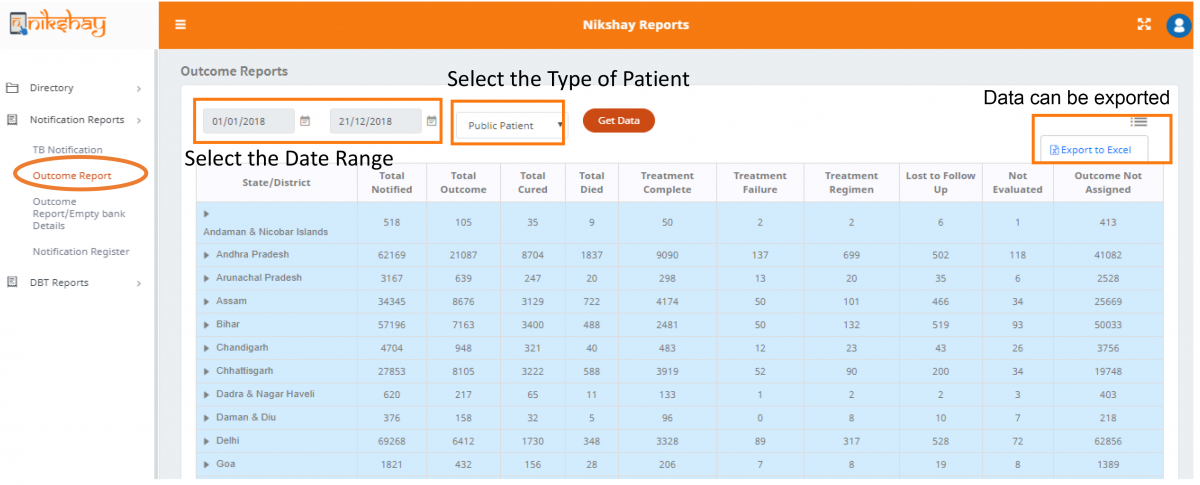
Figure: Outcome Report Display on Nikshay Online Portal
However, the outcome report depends on real-time data updating from the provider level. Any incomplete data updating may result in erroneous outcome reports. Hence, to get a correct outcome report, it is essential that all TB patients who have either completed their treatment, or have died or have discontinued treatment due to any reason (migrated, ADR, etc.), and their treatment outcome is filled in by Nikshay on a real-time basis.
Incomplete information in Nikshay can provide a wrong interpretation of the district’s treatment monitoring performance and overall treatment outcome. States and districts need to utilize this information for focused intervention for addressing challenges - comorbidities, delayed treatment initiation, treatment discontinuation due to any reason or treatment failure.
Video fileVideo: Outcome Report
Resources
PMDT Report
ContentVideo fileVideo: PMDT Report
Treatment Status
ContentVideo fileVideo: Treatment Status
UDST Report
ContentVideo fileVideo: UDST Report
Benefit Batch Register [DSC]
ContentVideo fileVideo: Benefit Batch Register (DSC)
DBT Signatory Register [DSC]
ContentVideo fileVideo: DBT Signatory Register (DSC)
DMC Register
ContentThis is a line list of tests conducted in a given PHI’s Designated Microscopy Center. The test might have been conducted for any presumptive or confirmed TB patient which belongs to any hierarchy across India. This register can be generated by selecting a given date range (Microscopy tests-Date Reported) and based on the testing facility.
This register gives details about the tests and final interpretation:
- Test ID, Lab serial number A and B.
- Date reported.
- Testing facility name and reason for testing.
- Predominant symptoms reported and their duration.
- Type of specimen for testing and visual appearance of sample.
- Result of sample A/ B.
- Final interpretation of test ( positive/negative).
- TB treatment start date and Treatment type ( first line drugs
Video fileVideo: DMC Register
PFMS Agency Register [DSC]
ContentVideo fileVideo: PFMS Agency Register (DSC)
Presumptive Case Register
ContentThis is a line list of Presumptive TB cases on the basis of enrolment (registration) date and enrollment facility in nikshay.
This register gives details about the following:
- Demographic details.
- Health Facility (Enrollment facility details ie.. State/District/ TU/PHI).
- Key population.
- HIV status.
- Microscopy and CBNAAT report availability.
Video fileVideo: Presumptive Case Register
Patient List UDST Excel export - Not Offered
ContentVideo fileVideo: Patient List UDST Excel export (Not Offered)
Accessing MERM report
ContentVideo fileVideo: Accessing MERM report
TB Notification Register
ContentVideo fileVideo: TB Notification Register
Fullscreen
