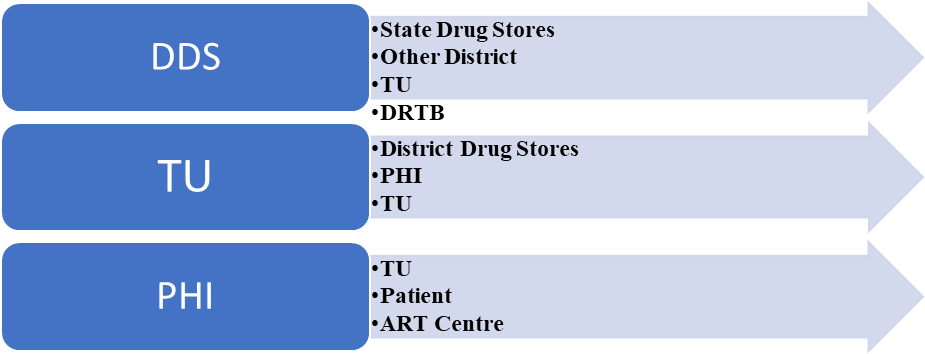

Issue of Supplies
ContentThe drugs and consumables procured by Central TB Division (CTD) are issued to States through Central Medical Services Society (CMSS) warehouses/ Government Medical Store Depots (GMSD). Drug requirements, consumption and stock positions, both at State and district levels are monitored at Central TB Division through the reports available in Ni-kshay Aushadhi.
- Dispatch of drugs shall be determined by the STO/DTO or officer in-charge (authorized by the STO/DTO for the purpose), on the basis of analysis of Stock available, stock required and Expiry analysis.
- Transfers to SDSs in other states, if any, shall be made on the basis of instructions (DTA) from CTD.
- Interstate SDS transfers: Between multiple SDSs within the state on the basis of instructions (DTA) of STO.
- Implementing DDSs shall be linked to the most convenient SDS (in terms of proximity and transportation arrangements), in the case of TU/ PHI, shall be linked to the most convenient DDS / TU respectively.
Figure 1: Flow of supplies in NTEP

Resources
Assessment
Question Answer 1 Answer 2 Answer 3 Answer 4 Correct answer Correct explanation Page id Part of Pre-test Part of Post-test Quarterly replenishment of drug stocks with districts shall be based on the QRPMLs. True False 1 Quarterly replenishment of drug stocks with districts shall be based on the QRPMLs. Yes Yes Process of Issuing Supplies
ContentProcess of Issuing Supplies
The stores may issue supplies to various sources. Several options are available on Ni-kshay Aushadhi to record the process of supplies to these sources. These options include:
Image
Dispatch on Drug Request:
This process is used to record drugs issued or dispatched to the district drug store in Ni-kshay Aushadhi, against the request generated through Ni-kshay Aushadhi. This includes both requests for routine quarterly supplies and additional drug requests.
Image
Dispatch without Drug Request
This process is used to record drugs issued or dispatched to the district drug store in Ni-kshay Aushadhi, without any request received from sub stores through Ni-kshay Aushadhi.
Image
Drug Transfer Advice (DTA)
This process is used to record the transfer/movement of drugs between two same-level stores, such as State Drug Sores (SDS) to SDS, District Drug Stores (DDS) to DDS or Tuberculosis Unit (TU) to TU level. This process is used to transfer excess drug stocks or near-expiry drugs to another same-level store so they can be consumed on time.
Image
Issue to Third Party
This process is used to record drugs issued to facilities registered as third-party users in Ni-kshay Aushadhi. These include DR-TB Centers, ART Centers, Medical colleges, and other health facilities mapped with the store.
Image
Resources
Nikshay Aushadhi Manual; Central TB Division, Ministry of Health and Family Welfare, Government of India.
Assessment
Answer 1
Answer 2
Answer 3
Answer 4
Correct answer
Correct explanation
Page id
Part of Pre-test
Part of Post-test
Issuing of supplies on routine quarterly and ADR are both on 'dispatch on drug request' window
True
False
1
Reach the ‘Dispatch on drug request’ window following the path Home-menu>services>issue/dispatch>Dispatch on drug request. Select the appropriate options from the drop-down menus to generate the list of requests raised (both quarterly and ADR).
Procedures following the dispatch of supplies
ContentDispatch of drugs shall be determined by the State TB Officer (STO)/District TB Officer (DTO) or officer in charge (authorized by the STO/DTO for the purpose) on the basis of analysis of stocks, consumption and expiry analysis.
The Storekeeper shall perform the following activities for releasing drugs to sub-stores:
Image
Figure 2: Process of releasing drugs to sub-stores
While the storekeeper shall strictly follow FEFO principle, it is also expected from them to exercise due prudence in case of short expiry drugs. The distribution should be rational, keeping in view each district's utilisation pattern with instructions to ensure timely consumption of such close-to-expiry drugs. The same steps are to be followed by sub-stores: District Drug Stores (DDSs) and Tuberculosis Units (TUs).
Resources
1. Standard Operating Procedure Manual- Procurement & Supply Chain Management; RNTCP, MoHFW, GoI 2019.
Assessment
Question Answer 1 Answer 2 Answer 3 Answer 4 Correct Answer Correct Explanation Page ID Pre test Post Test How many copies of the issue voucher (IV) are required during the dispatch of supplies? 5 3 2 1 2 Three copies of issue vouchers (IV) are required during the dispatch of supplies- first and second copies to transporter and the third copy as acknowledgement (consignor's copy) from transporter.
The second copy (consignee's copy) comes back from respective DTCs after receipt of supplies.
yes yes Reporting of dispatch in Nikshay Aushadhi : On Request
ContentReporting of dispatch in Ni-kshay Aushadhi: On Request
This process is used to record drugs issued or dispatched to State Drug store, district drug store, TU, and PHI Stores against the request generated through Ni-kshay Aushadhi.
Process overview:
Image
Detailed stepwise procedure:
Step 1: Go to the Ni-kshay Aushadhi website and click on login. Enter your user ID, Password, captcha text and click login.
Step 2: From the ‘Home menu’, under the services section click on ‘issue dispatch’ tab and then on the ‘dispatch on drug request’ tab.
Step 3: Select the store type to display the list of pending drug requests.
Image
Step 4: Select the request number from the list and click ‘issue’ to open a new window.
ImageStep 5: Fill in the requisite information and click on the ‘save’ tab to generate the issue voucher. The voucher can be saved or printed as per the need.
Image
Resources
Assessment
Question Answer 1 Answer 2 Answer 3 Answer 4 Correct answer Correct explanation Page id Part of Pre-test Part of Post-test Dispatch on drug request option is used to record drugs dispatch to which stores? SDS DDS TU/PHI All of the above 4 This process is used to record drugs issued or dispatched to State Drug store, district drug store, TU, and PHI Stores against the request generated through Ni-kshay Aushadhi. Yes Yes Reporting of dispatch in Nikshay Aushadhi : Without Request
ContentReporting of Dispatch in Ni-kshay Aushadhi: Without Request
This process is used to record drugs issued or dispatched to State Drug Store (SDS), District Drug Store (DDS), TB Unit (TU) and Peripheral Health Institute (PHI) stores without any request through Ni-kshay Aushadhi.
Process Overview
Image
Figure 1: Overview of reporting dispatch without request
Stepwise procedure:
Step 1: Go to the Ni-kshay Aushadhi website and click on login. Enter your User ID, Password, captcha text and click login.
Step 2: From the ‘Home Menu’, under the services section, click on the ‘Issue Dispatch’ tab and then click on the ‘Dispatch without Request’ tab.
Step 3: Fill in the required information of the facility to which the supply is being issued in the ‘Dispatch Without Request’ page.

Figure 2: 'Dispatch without drug request' window in Ni-kshay Aushadhi
Source: Ni-kshay Aushadhi portal
Step 4: Click on the ‘Drug Finder’ tab on the extreme right corner of the page. A popup window will appear where you can select the item/items to be issued. Once selected, click on the ‘Add’ tab to add the items.

Figure 3: Entry of drug details
Source: Ni-kshay Aushadhi portal
Step 5: Click the ‘Save’ tab to generate the issue voucher. The voucher can be saved or printed as per the need.
Resource
Assessment
Answer 1
Answer 2
Answer 3
Answer 4
Correct answer
Correct explanation
Page id
Part of Pre-test
Part of Post-test
Issue without dispatch option is used to record drugs dispatch to which stores?
SDS
DDS
TU/ PHI stores
All the above
4
This process is used to record drugs issued or dispatched to SDS, DDS, TU, and PHI Stores without any request through Ni-kshay Aushadhi.
Yes
Yes
Consumption of supplies
ContentNTEP provides quality drugs to all the diagnosed TB patients without any interruption. Under NTEP, 1st line drugs are being provided in monthly blister strips of Fixed Dosage Combination (FDC) for Drug Sensitive TB patients according to their weight-bands. For drug resistant TB patients, drugs are provided in monthly boxes depending upon their weight-band and resistance pattern (Mono-resistance, poly-drug resistance, Multi Drug Resistance, Extensive Drug Resistance).
Different Supplies are utilized at different locations.
Supplies to patient from PHI
Patients to receive drugs for the treatment of drug sensitive TB or drug resistant TB by DOTS Provider or Treatment Supporter as per the regimen prescribed by the doctor. The DOTS Provider or Treatment Supporter shall receive drugs from Peripheral Health Institution (PHI). PHIs shall issue drugs on monthly basis against the unique Notification ID generated by Nikshay through Nikshay Aushadhi.
Supplies to ART Centre
Drugs which are required to be issued to Anti Retroviral Therapy (ART) Centre for the TB-HIV patient under collaboration of TB and National AIDS Control Organization (NACO), will require to be issued through Nikshay Aushadhi in order to capture the stock being consumed by these ART centres. Programme is in integration NACO and in future Nikshay Aushadhi shall have direct request from ART Centre through their system and accordingly, drug shall be released.
Supplies to Private Sector and Supplies to Lab
Private pharmacies will be involved in dispensation of anti-TB drugs supplied from NTEP to give access to TB patients who seek care in private sector, after consultation with private practitioners. To support the pharmacies for arranging such mechanism for keeping NTEP supplied Fixed Dose Combination (FDC), District TB Officer (DTO) may consider incentives to such pharmacies. NTEP should also arrange for regular uninterrupted drug supply. Monthly PHI report should be used for drug inventory management.
Supplies to Lab
Cartridges/chips are supplied based on the stock availability, consumption and expected cases load. Recording, reporting and monitoring of cartridges/chips is done through Nikshay-Aushadhi.
Supplies to Nodal/District Drug-Resistant TB Centres (N/DDRTBC)
Drugs are issued to the DDSs/NDRTBC based on requirement. At the same time drugs are received from Government Medical Store Depots (GMSDs) .
The drugs are also issued to patients from DR-TB centres, such as Bedaquline or Delamanid. In Nikshay Aushadhi application, the DRTB stores are mapped onto a PHI login id. A DRTB centre which is associated with a PHI, is added on that PHI login id. The user can select the stores either PHI or DRTB, as per the requirement, to use any process.
Medical supplies to Non-TB patents:
The State Drug Store (SDS) shall supply full courses of TB Preventive Therapy (TPT) per person with a buffer stock of 3 months to all the districts on quarterly basis, districts will supply further with a buffer stock of 2 months to all TUs on monthly basis and TUs will supply further with a buffer stock of 2 months to all Health Facility on a monthly basis.
Resources
1. Nikshay Aushadhi User Manual
2. NTEPTrainingModules5to9 Central TB Division, MoHFW, GoI 2020
Assessment
Answer 1
Answer 2
Answer 3
Answer 4
Correct answer
Correct explanation
Page id
Part of Pre-test
Part of Post-test
Consumption of supplies available at PHI store TU store
DDS
NDRTBC
All of the above
Consumption of supplies available at all levels Nikshay - Drug Dispensation Module
ContentThe Drug Dispensation Module in Ni-kshay web allows users to record details of products and the quality of the drugs issued to the patients. This module was launched to replace the existing Prescription Module and to add a variety of features that were missing in the Prescription Module. The user can access the dispensation for a particular patient from the Patient Details page, or directly from the navigation sidebar.
Image
Figure: Access to Drug Dispensation Module from the Navigation Bar or from the Patient Detail Page
The Drug Dispensation Module allows the users to perform the following different processes:
Process
Utility
Add Dispensation
This process allows users to record information on dispensation details, drug issuing facility, and product and refill details.
Print Dispensation
This process allows users to download and print a PDF containing all the information for a dispensation.
Return Dispensation
This process allows users to record events of dispensed drugs being returned back. To return a dispensation, the staff can select the drugs to be returned and add an appropriate reason for returning the drugs.
Copy Dispensation
This process allows users to create a copy of an existing dispensation for a patient thereby saving time by avoiding repetitive data entry.
Refill Due Task list
This process will show the list of patients who have a "Next Refill Due Date" in 2 days or less. It serves as a reminder so that the user can dispense the drugs on time.
Outcome assignment changes
This process automatically extends the “Treatment End Date” in the cases where the “Next Refill Due Date” is greater than the “Treatment End date”. A note for the same is also added.
Adherence linkage
This process allows users to switch on/off the linkage between dispensation and adherence. In case the link is switched on, no manual doses will be registered for the patient's adherence.
Currently, the link is defaulted to "Yes" for Drug-sensitive TB (DS-TB) patients and "No" for Drug-resistant TB (DR-TB) patients.
Resources
Answer 1
Answer 2
Answer 3
Answer 4
Correct answer
Correct explanation
Page id
Part of Pre-test
Part of Post-test
Dispensation for a particular patient can be accessed from the patient details page only.
True False 2 The user can access the dispensation for a particular patient from the Patient details page, or directly from the navigation sidebar. YES Adding and Printing Dispensation
ContentVideo fileReturning Dispensation
ContentVideo fileAdd and view prescription
ContentVideo fileVideo : Add and view prescription
Dispensation Correlation
ContentVideo fileViewing Refill Task List
ContentVideo file
Fullscreen